Installation
The daemon runs on the Mac you want to control. Your phone needs nothing — the Mini App opens inside Telegram.
Requirements
- macOS 12 Monterey or later
- Node.js 22 or later (or Bun 1.x)
- A Telegram account
SESSION_TOKEN— provided when you get access to Teleportus
Install the daemon
Run it on your own computer:
npx remote-claude-daemon@latest --token {{SESSION_TOKEN}}SESSION_TOKEN is provided in your welcome message from the bot.
On first launch the daemon compiles a small Swift screenshot binary — this takes about five seconds and happens only once.
You will then be asked for two macOS permissions. Both are required:
| Permission | What it's for |
|---|---|
| Screen Recording | Capturing frames to stream to your phone |
| Accessibility | Moving the mouse and pressing keys remotely |
Grant them in System Settings → Privacy & Security and restart the daemon if needed.
Menu bar tray
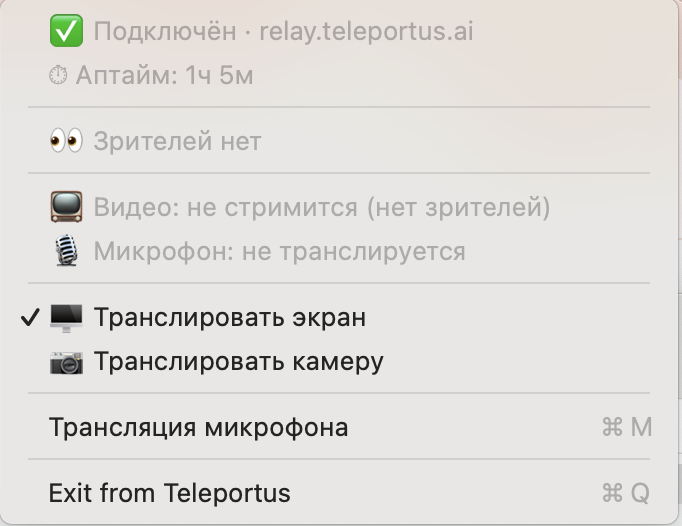
Once running, Teleportus adds an icon to the macOS menu bar. Click it to see:
- Connection status and the relay you're connected to
- Uptime — how long the daemon has been running
- Viewer count — how many people are watching
- Video / microphone status — whether each is currently streaming
- Toggles to stream the screen or stream the camera
- Broadcast microphone (⌘M)
- Exit (⌘Q)
Keep it running with launchd (optional)
Optional step
Only needed if you want the daemon to start automatically on login. For normal use, running the command manually is enough.
To start the daemon automatically on login, create a launchd plist at ~/Library/LaunchAgents/com.teleportus.daemon.plist:
<?xml version="1.0" encoding="UTF-8"?>
<!DOCTYPE plist PUBLIC "-//Apple//DTD PLIST 1.0//EN"
  "http://www.apple.com/DTDs/PropertyList-1.0.dtd">
<plist version="1.0">
<dict>
  <key>Label</key>        <string>com.teleportus.daemon</string>
  <key>ProgramArguments</key>
  <array>
    <string>/usr/local/bin/npx</string>
    <string>remote-claude-daemon@latest</string>
    <string>--token</string>
    <string>your-session-token</string>
  </array>
  <key>RunAtLoad</key>    <true/>
  <key>KeepAlive</key>    <true/>
</dict>
</plist>
Then load it:
launchctl load ~/Library/LaunchAgents/com.teleportus.daemon.plistDebug mode
Run with --debug to see verbose logs:
npx remote-claude-daemon@latest --token {{SESSION_TOKEN}} --debugYou'll see frame timings, input events, WebSocket reconnect attempts, and any macOS permission errors (Screen Recording and Accessibility).
Uninstall
launchctl unload ~/Library/LaunchAgents/com.teleportus.daemon.plist
rm ~/Library/LaunchAgents/com.teleportus.daemon.plist
npm uninstall -g remote-claude-daemon
Revoke macOS permissions in System Settings → Privacy & Security if desired.